

Introduction
In today’s digital age, having a reliable home network is more important than ever. Whether you’re working from home, streaming content, or gaming online, understanding the components of your home network can help you make informed decisions and ensure optimal performance. This guide will walk you through the various types of home networks and the components you need to get started.
Types of Home Networks
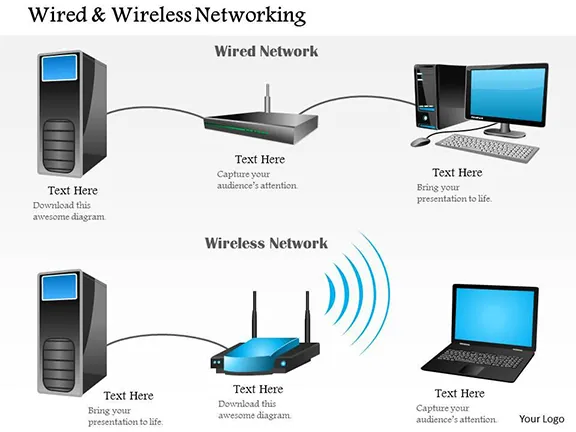
1. Wired Ethernet Network
Best For: Computers in the same room or nearby locations.
Components Needed:
- Network Interface Cards (NICs): These are installed in each computer to enable network connectivity. NICs come in various types, including PCI and USB adapters.
- CAT 5 or CAT 6 Cabling: High-quality Ethernet cables ensure reliable and fast data transmission.
- Hub or Switch: A hub connects multiple devices, while a switch provides more advanced features, such as traffic management and faster data transfer rates.
- Special Bridging Software: This software links your systems together, allowing them to share an internet connection.
Advantages:
- Speed: Wired networks offer faster and more stable connections compared to wireless networks.
- Security: Wired connections are less susceptible to interference and hacking attempts.
Disadvantages:
- Flexibility: Limited by the length of cables, making it less suitable for devices that need to be moved frequently.
2. Wireless Home Network
Best For: Computers in different rooms or when you need the convenience of moving devices around.
Components Needed:
- Wireless Router: Acts as the central hub for your wireless network, managing data transmission between devices.
- Wireless NIC Cards: Installed in each computer to enable wireless connectivity.
- Radio Transceivers: These devices use radio frequency to transmit and receive data, allowing for greater flexibility in device placement.
Advantages:
- Convenience: No cables means easier setup and the ability to move devices freely.
- Flexibility: Ideal for homes with multiple floors or large spaces.
Disadvantages:
- Speed: Generally slower than wired connections and can be affected by interference from other electronic devices.
- Security: More vulnerable to hacking and eavesdropping if not properly secured.
3. Powerline Network
Best For: Homes where running Ethernet cables is impractical, but electrical outlets are readily available.
Components Needed:
- Powerline Adapters: These devices plug into your electrical outlets and use the existing wiring to transmit data.
- Router: Required for data transfer and managing network traffic.
- NIC Cards: Necessary for each computer to connect to the network.
Advantages:
- Easy Setup: Utilizes existing electrical wiring, eliminating the need for new cables.
- Coverage: Can provide network access to areas of your home where running Ethernet cables is difficult.
Disadvantages:
- Speed: Typically slower than wired Ethernet, with speeds ranging from 50 kbps to 350 kbps.
- Interference: Electrical noise can affect network performance.
4. Phoneline Network
Best For: Homes with readily available phone jacks and a need for a simple, reliable network.
Components Needed:
- Phoneline Network Adapters: Installed in each computer to enable network connectivity over phone lines.
- Switch, Gateway, or Router: These devices manage data transfer and share internet access among connected devices.
- Phone Filters: Reduce line noise and improve network performance.
- Line Splitter: Allows you to use a single phone jack for both voice and data transmission.
Advantages:
- Ease of Setup: Generally considered the easiest home network to set up.
- Reliability: More dependable and faster compared to powerline networks.
Disadvantages:
- Speed: Limited to 10 Mbps, which may not be sufficient for high-bandwidth activities.
Setting Up Your Home Network
Step-by-Step Guide
- Choose the Right Network Type:
- Same Room: Wired Ethernet
- Different Rooms: Wireless or Powerline
- Phone Jacks Available: Phoneline
- Gather Necessary Components:
- Refer to the components listed above for your chosen network type.
- Install Hardware:
- NIC Cards: Insert into available slots (PCI or USB) on each computer.
- Cables/Adapters: Connect devices as per your network type (Ethernet cables, powerline adapters, etc.).
- Configure Software:
- Operating System: Most modern OS (Windows, macOS, Linux) come with built-in network configuration tools.
- Device Drivers: Install drivers provided with your hardware to ensure proper functionality.
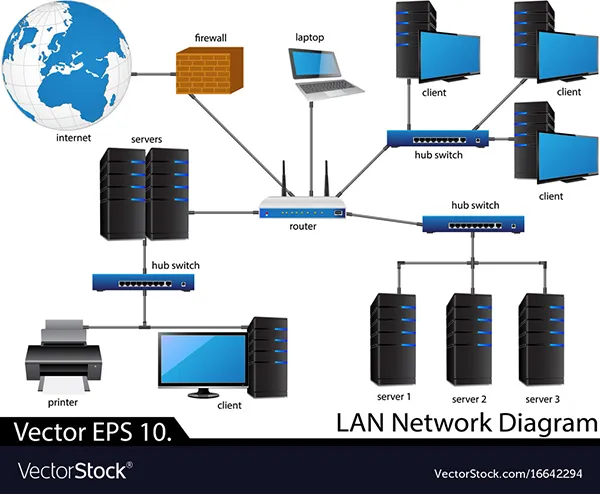
- Set Up Router/Switch:
- Wireless Router: Configure SSID, password, and security settings.
- Switch/Hub: Connect all devices and ensure proper cable management.
- Test Connection:
- Verify that all devices can communicate with each other and access the internet.

Optimizing Your Home Network
Tips for Better Performance
- Update Firmware: Regularly update your router and network adapter firmware for the latest performance improvements and security patches.
- Choose the Right Channel: For wireless networks, select a less congested channel to minimize interference.
- Quality of Service (QoS): Prioritize bandwidth for critical applications to ensure smooth performance.
- Secure Your Network: Use strong, unique passwords and enable encryption (WPA3 for wireless networks) to protect your data.
Conclusion
Understanding the components of your home network is the first step toward creating a reliable and efficient connectivity solution. Whether you opt for a wired, wireless, powerline, or phoneline network, each has its own set of components and advantages. By carefully considering your needs and following the setup guidelines, you can ensure a seamless and secure networking experience. Stay informed about the latest networking technologies and updates to make the most of your home network.



Leave a Reply