

Create less. Publish more. Strategy and automation without sounding robotic.
CHAPTER 4
Honestly
You finally write something good. You hit “post”……and then what?
It vanishes in the scroll. You’re back at square one tomorrow.
And suddenly “consistent posting” feels like a full-time job you didn’t apply for.
But here’s the truth: You don’t need more content. You need to stretch the great stuff you already made. That’s what content repurposing is all about — and this chapter is going to make it your new superpower.
The Repurposing Shift
Content isn’t a one-time-use thing.
Think of it like a great scene in a movie — it gets trailers, gifs, quotes, remixes, behind-the-scenes reels, and reposts.
You’re the stage. Your content is the scene.
You should be getting more from it.
Mini Action Break #1: Choose a Core Idea
Pick one piece of content you’ve already made that represents your brand well.
This could be:
• A story or moment from behind-the-scenes
• A powerful quote or message you shared
• A tip you posted that got saved or shared
• A service or offering you’re promoting
Write down that core idea now.
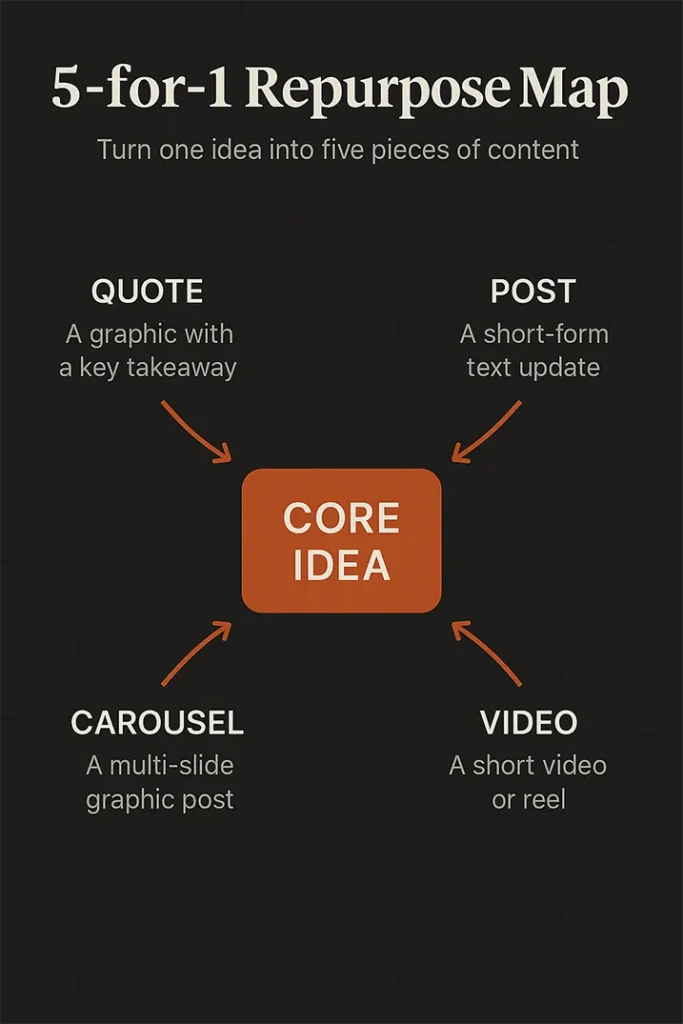
We’re about to turn it into 5 unique content pieces.
The 5-for-1 Repurpose Framework
Here’s how to spin one idea into five formats — without repeating yourself:
| Format | Example Use |
|---|---|
| 1. Story Post | Personal voice, show the human behind the message |
| 2. Carousel or Reel | Step-by-step breakdown or transformation |
| 3. Quote Graphic | Pull the punchline or insight for shareable impact |
| 4. Behind-the-Scenes | Talk about how/why it was made, or what inspired it |
| 5. Call-to-Action Post | Direct invite to book, join, or comment based on the idea |
You just created an entire week of content from one idea.
Mini Action Break #2: Map It Out
Use this template with your chosen idea:
• Story/Post Caption: __________
• Carousel or Reel Steps: __________
• Quote Line: __________
• BTS Angle: __________
• CTA: __________
Boom — you now have 5 aligned posts ready to schedule.
But What About the Tech?
If this part overwhelms you — relax. You don’t need to be a tech wizard. Here’s a basic workflow:
Recommended Tools:
• Writing & Storage: Notion, Google Docs, or Trello
• Design: Canva (use branded templates!)
• Scheduling: Later, Buffer, or Metricool
• Repurpose AI: Use AI prompts to remix headlines, captions, or angles on demand
You don’t need to automate everything — just enough to stay consistent without burnout.
If this blog has been helpful buy us a cup of coffee. Will keep them coming donate what you want (minimum’s $2) Scan QR code Donate with strip.
Download the Automation Blueprint + Planner
Plan and build your 5-for-1 system using this simple guide. Includes:
• Plug-and-play content repurpose map
• Tool checklist
• Scheduling rhythm guide
Pay what you want (minimum $2)
[Download chapter 4 worksheet Repurposing Blueprint worksheet]
Coming Next:
Chapter 5: Free Tools to Run It Like a Pro
From design to scheduling — the best tools to build your brand without burning cash.



Leave a Reply